
Orbi är en app riktas mot högskolor och universitet med syftet att det ska bli lättare för studenter att engagera sig i studentlivet. Förutom att köpa och sälja kurslitteratur, hitta olika studentrabatter och få en fot in på arbetsmarknaden så underlättar Orbi framförallt att hitta information om allt kul som händer på campus, och det är dessa funktioner vi använder oss av under Insparken.
Orbi is an app aimed towards universities so that it’s easier for students to engage with the student life. Apart from buying and selling course literature, finding different types of student discounts and getting some help career wise, Orbi also primarily helps with figuring out what is happening on campus and this is what we’ll be using during Insparken.
Ladda ned Orbi där du brukar ladda ner appad, exempelvis App store eller Google play. Appen är helt gratis. Skapa ett konto och följ stegen.
På frågan om var du studerar, välj Sverige och sök efter Malmö Universitet.
På frågan om var vid Malmö Universitet du hör hemma, välj Studentkåren Malmö (det andra alternativet är för tandvårdsstudenter).
Du kommer få frågan om vilken fakultet du studerar vid, alternativen är:
Hälsa och Samhälle (Röda laget)
Kultur och Samhälle (Blå laget)
Lärande och Samhälle (Gula laget)
Teknik och Samhälle (Gröna laget)
Osäker på vilken fakultet du studerar vid? Leta upp din utbildning HÄR, klicka in dig på den och bläddra allra längst ned på sidan. I den lila rutan står det “Utbildningen ges av…” följt av namnet på din fakultet.
Nu är du redo att utforska Orbi!
Download the Orbi app from wherever you get your apps, be it App store or Google play. The app is completely free. Create an account and follow the steps.
You’ll be asked where you’re studying and at what school. Select Sweden and search for Malmö Universitet.
When prompted where on Malmö Universitet you belong, select Studentkåren Malmö (the other option is for dentistry students).
Youll be asked which faculty you’re studying at, the options are
Hälsa och Samhälle (Health and Society / Red team)
Kultur och Samhälle (Culture and Society / Blue team)
Lärande och Samhälle (Education and Society / Yellow team)
Teknik och Samhälle (Technology and Society / Green team)
Not sure what faculty you’re studying at? Search for your program/course HERE and when you find it, scroll all the way to the very bottom. In the purple box, it say “This education is provided by…” followed by the name of your faculty.
Now you’re live!

Allra längst ned i appen finner du alternativen Campus, Books, Orbi, Career och Discounts.
Under insparken är det framförallt Campus och Orbi du behöver hålla koll på.
Mittenknappen, Orbi, är ditt flöde. Här ser du vad de du följer publicerar, och du kan även skicka meddelanden till andra studenter.
Längst till vänster, Campus, är var du hittar allt du behöver hålla koll på under Insparken.
At the very bottom in the app you’ll find the alternatives Campus, Books, Orbi, Career and Discounts.
During Insparken it’s primarily alternatives Campus and Orbi you’ll need to keep and eye on.
The middle button, Orbi, is your feed. Here you’ll see what everyone you follow published and you can also send messages to others.
At the far left, Campus, is where you’ll find everything you need to know during Insparken.
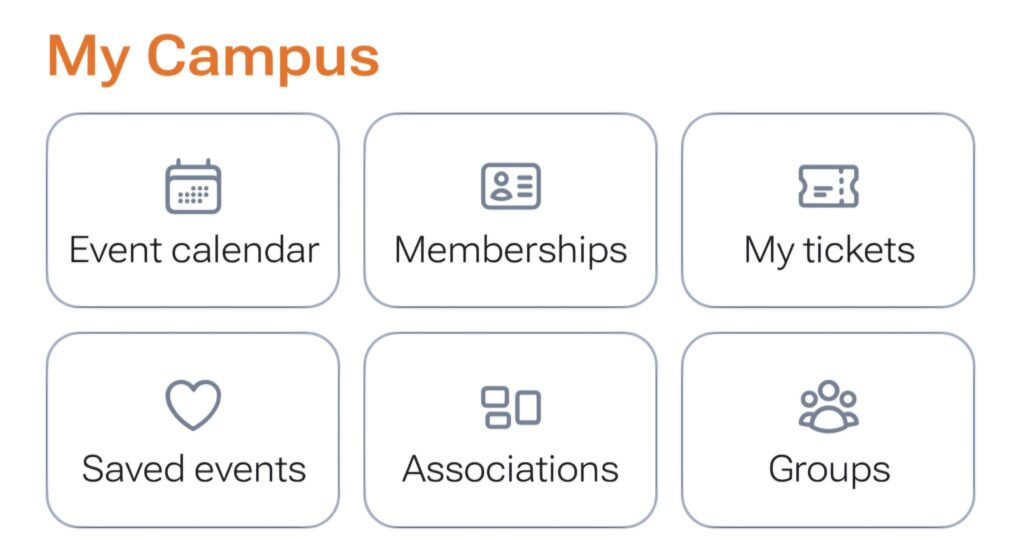
Under Campus möts du av alternativen Eventkalender, Medlemskap, Mina biljetter, Sparade event, Associations och Grupper.
Eventkalender
Här hittar du alla evenemang från föreningar du följer. Genom att välja att du hör hemma vid Studentkåren Malmö när du skapar ditt konto kommer du automatiskt följa alla föreningar, sektioner och studentgrupper som arrangerar evenemang som du kan delta på. Här kommer du se alla aktiviteter som arrangeras under insparken och du kan se på det som insparksschemat.
Om du klickar in dig på ett event får du all information som behövs, så som var, när och vad som kommer hända. Vissa evenemang kräver att man köper en biljett och då hittar du även denna information här. På de tre prickarna i övre högra hörnet kan du välja att spara ett event.
Medlemskap
Här hittar du alla dina medlemskap. Till en början ser det kanske tomt ut, men när du börjat bekanta dig med Malmös studentliv samt gått med i ditt insparkslag kommer du hitta dina medlemskap här.
Mina biljetter
Om du har köpt en biljett till något event hittar du den här. Den behövs vid insläpp till evenemanget.
Sparade event
Här hittar du de event du sparat. Kanske vill du ha en enklare överblick över de evenemang du valt att gå på? Spara dem från eventkalendern och se dem här.
Associations
Här hittar du eventuella föreningar du är med i eller sådana som du bara följer, utan att vara medlem i dem. Om du vill hitta MAU Inspark nu i början, innan du skaffat ett medlemskap i något av våra lag, bläddra ner tills du ser de föreningar du följer. Hittar du oss inte direkt kan du klicka på Se alla och bläddra tills du hittar MAU Inspark.
Grupper
Detta är inget vi använder oss av under insparken, men kanske att ni skapar en egen grupp med några kursare för att plugga tillsammans inför tentan?
Under Campus you’ll see the alternatives Event calendar, Memberships, My tickets, Saved events, Associations and Groups.
Event calendar
Here you’ll find all the events from the associations you follow. By picking Studentkåren Malmö when you created your account you’ll automatically follow all the associations, sections and student groups that host events relevant for you and that you’ll be able to attend. Here you’ll find all the events and activities during Insparken and you can view it as the official Insparken schedule.
If you click on an event you’ll get all the information needed, such as when, where and what’ll happen. For some events you’ll need to purchase a ticket and you’ll find that info here as well. On the three dots in the top right corner you can choose to save an event to easily find it later.
Memberships
Here you’ll find all your memberships. At first it might look a bit empty but once you get familiar with all thah the Malmö student life has to offer and join your Inspark team you’ll find all of your memberships here.
My tickets
If you’ve purchased a ticket to an event you’ll find it here. It’ll be needed when you’re entering the event.
Saved events
Here you’ll find the events that you’ve saved. Maybe you want a better overview of the events you’ll be attending? Save them from the calendar and find them here.
Associations
Here you’ll find any associations you’re apart of, or those that you simply follow without being a member. If you want to find MAU Inspark now before you’ve gotten a membership, scroll to the bottom until you see the associations you follow. If you don’t find us immediately, click See all and scroll until you find MAU Inspark.
Groups
This isn’t anything we’ll be using during insparken, but maybe you’ll want to create your own group with some class mates to study together for the exam?
För att hitta MAU Insparks Orbiprofil, välj Campus i den nedre menyn och sedan Associations. Scrolla allra längst ned för att hitta de föreningar du följer. Ser du oss inte direkt kan du klicka på Se alla och bläddra tills du hittar MAU Inspark.
Du hittar oss även på Denna länk!
To find the MAU Inspark Orbi page, select Campus in the bottom menu and then Associations. Scroll all the way to the bottom to see the associations that you follow. If you don’t find us righ away, click See all and scroll until you find MAU Inspark.
You’ll also find us on This link!
För att få all information om Insparken behöver du skaffa ett medlemskap i ditt lags Orbi-grupp.
Gå till MAU Insparks orbiprofil, du ser precis här ovan hur du gör. Högst upp på vår profil, i de fyra rutorna, finns alternativen About, Events, Memberships och Discounts.
Välj Memberships. Här hittar du samtliga lags medlemskap. Det är viktigt att du går med i rätt (och enbart det) och vilket lag du tillhör beror på vad du studerar.
Röda laget – Hälsa och samhälle (HS)
Gula laget – Lärande och samhälle
(LS)
Gröna laget – Teknik och samhälle
(TS)
Blå laget – Kultur och samhälle (KS)
(Du kommer direkt till respektive lags medlemskapssida genom att klicka på länkarna ovan)
Osäker på vilken fakultet du studerar vid? Leta upp din utbildning HÄR, klicka in dig på den och bläddra allra längst ned på sidan. I den lila rutan står det “Utbildningen ges av…” följt av namnet på din fakultet.
När du har hittat rätt medlemskap, klicka in på det och tryck på BUY, den svarta knappen. Medlemskapet är helt gratis, men appen kommer ändå ta dig igenom betalningsskärmen.
När du “köper” ditt medlemskap finns enbart ett alternativ, ett helt kostnadsfritt medlemskap som heter Inspark 2026. Klicka på det, besvara frågorna och välj sedan knappen längst ned för att fortsätta. Du ser då din kundvagn och återigen behöver du klicka längst ned för att slutföra.
Om allt gått som det ska och du nu är medlem i ditt lag så ska du kunna hitta medlemskapet i appen om du väljer Campus allra längst ned och sedan Medlemskap. Det är här, på Medlemskap och sedan i själva medlemskapet du kan se allt som postas i gruppen.
To recieve all information regarding Insparken you’ll need to get a membership in the team Orbi group.
Head on over to the MAU Inspark Orbi page, see above for how. At the top of our page you’ll see the alternatives About, Events, Memberships & Discounts.
Choose Memberships. Here you’ll find all the different team memberships. It’s important that you join the right one (and only that one) and which team you should join depends on what you study.
Red team – Health and Society (HS)
Yellow team – Education and Society (LS)
Green team – Technology and Society (TS)
Blue team – Culture and Society (KS)
(You’ll also go straight to the different team membership pages by clicking the links above)
Not sure what faculty you’re studying at? Search for your education HERE and when you find it, scroll all the way to the very bottom. In the purple box, it say “This education is provided by…” followed by the name of your faculty.
When you’ve found the correct membership, click it and press BUY, the black button. The membership is completely free, but the app will still take you through the payment screen.
When you “buy” your membership there’s only one option, a completely free membership called Inspark 2026. Press that, answer the questions and then continue with the button at the bottom. You’ll be taken to check out and once more you’ll need to press the button at the very bottom.
If everything worked out and you’re now a member in your team you should be able to find it in the app by choosing Campus in the bottom menu and then Memberships. It’s here, under Memberships and then within the membership itself, you’ll be able to find everything posten in the group.